A working home building budget in Excel: the budget, allowances, change orders, draws and funding on linked tabs, filled in with a sample build so you can see how the numbers flow before you replace them with yours.
| Line item | Budget | Actual | Over / under |
|---|---|---|---|
| Land and site work | |||
| Survey and soil test | $4,000 | $4,000 | on budget |
| Clearing and excavation | $24,000 | $24,000 | on budget |
| Driveway | $26,000 | $26,000 | on budget |
| Septic and water | $20,000 | ||
| Allowances (Allowances tab) | |||
| Flooring material and labor | $27,000 | $35,483 | $8,483 over |
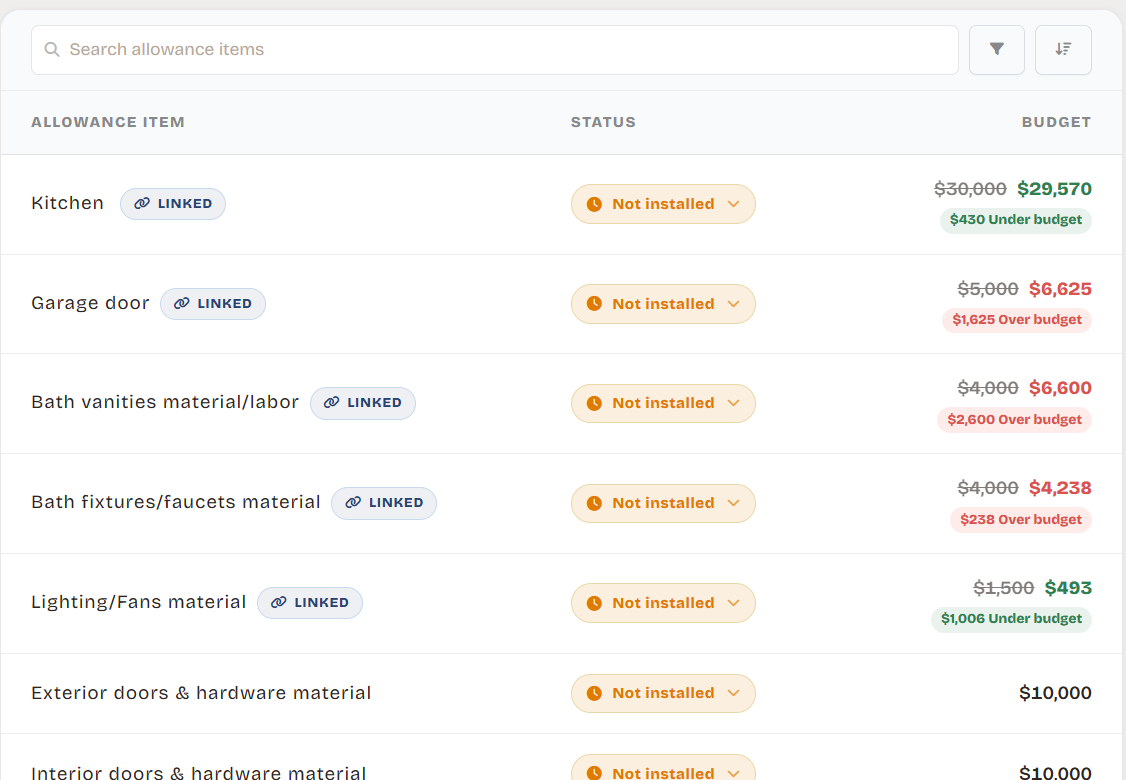
| Bath vanities | $4,000 | $6,600 | $2,600 over |
| Kitchen | $30,000 | $29,570 | $430 under |
| Build budget | $712,000 | ||
| Approved change orders | $17,800 | ||
| Allowance overage, counted | $11,016 | ||
| Projected total | $740,816 | ||
Free download
Home building budget template
- Excel file, opens in Google Sheets and Numbers
- Five tabs, formulas already linked
- Worked example you can overwrite
- No sign-up, no email
What is in the template
- Budget
- Every line from site work to contingency, with budget, actual and over or under. Change orders count once you mark them approved.
- Allowances
- Each allowance against the running total of your picks. Overages count right away; savings wait until every pick is decided.
- Draws
- Each builder draw, split into what the bank paid and what your cash paid, so you can see what is not covered yet.
- Funding
- Your loan less closing costs, down payment, sale proceeds and cash against the projected total and extras: left over, or short.
How to use it
- 1Swap in your budgetReplace the example lines with your builder's budget. The shaded cells are inputs; the totals are formulas.
- 2Enter your allowancesType each allowance from the contract and the total of your picks so far. Mark it decided when every pick is final.
- 3Log changes and draws as they happenAdd each change order and set it to approved when you sign it. Split each paid draw between the bank and your cash.
- 4Check the Funding tabFill in the loan, closing costs, down payment, sale proceeds and cash. It tells you what is left over after the reserve.
Lines people leave out of a build budget
- Site work: driveway, septic or sewer, well or water and utility connections can run tens of thousands on their own.
- Soft costs: plans, engineering, permits, builder's risk insurance and loan closing costs.
- Extras outside the contract: appliances, window coverings, landscaping and the move.
- Contingency: 10 to 15% of construction for the surprises you will not avoid.
Need a total before you fill in every line? Try the home build cost calculator.
Where a spreadsheet stops helping
The template works well for planning. These are the places it strains once construction is moving, using the same sample build.
Every change is a manual edit
Approving the $15,000 paint upgrade means editing the change order, then checking the projected total, the funding tab and anything else that read from it.
Loan interest is not in it
Interest grows with every bank draw. In the example it is $1,690 a month, and a budget sheet has no idea.
The finished payment lives elsewhere
Whether the house is affordable after move-in, the mortgage and your DTI, needs a second spreadsheet, if anyone builds it.
Receipts and photos end up in email
Quotes, contracts and selection photos sit in threads and folders instead of next to the line they belong to.
The same budget in Groundbase
Groundbase is a home building budget tracker built for homeowners, made to replace this spreadsheet once the build starts. The same lines, allowances, change orders and draws, connected: approve a change and the projected cost, funding and finished payment update together. It adds construction loan interest, your DTI and the finished mortgage, and keeps contracts, receipts and photos on the line they belong to.
Common questions
Is the template free?
Yes. It is an Excel file that also opens in Google Sheets and Numbers. No sign-up, no email.
What categories should a home building budget include?
Land and site work, soft costs such as plans, permits and insurance, the structure and systems, interior finishes, allowances for the choices you have not made yet, change orders, a contingency of 10 to 15% of construction, and extras bought outside the contract like appliances and furniture.
When should I move off a spreadsheet?
Usually when construction starts. A spreadsheet is fine for a first estimate. Once draws, change orders and selections arrive every week, keeping every total right by hand is where mistakes creep in.